Make Your Own Instrumentals: A Fun Dive Into Modern Audio Separation
A hands-on exploration of modern audio-separation tools for splitting songs into vocals, drums, bass, and other stems.

Illustration image
There is something special about a few songs.
You’ve heard them hundreds of times, you know every lyric, every pause, every guitar fill. And at some point, a simple curiosity kicks in (at least for me):
It would be awesome to have all the tracks as instrumentals, but how easily can I do it?
Not a remix, not a cover—just the music, clean, isolated, and untouched.
That curiosity is what led me to build Karaoke Extractor, a small side project to generate instrumental (karaoke-style) tracks from almost any audio or video file. At this point, I chose to prioritize compatibility over chasing perfection.
It was about exploring how far modern music separation has come—and having some fun with it.
The State of Music Separation Has Quietly Improved
A few years ago, removing vocals meant frequency hacks, phase-inversion tricks, and very mixed results.
Today, libraries like Demucs have changed the game.
Demucs uses deep-learning models trained specifically to separate music sources—vocals, drums, bass, and other instruments—with surprisingly good quality, even on older recordings.
What stood out to me is that classics work well, live recordings worked better than expected, and the results are consistent enough to be enjoyable.
It’s not magic, but it’s no longer a gimmick either!
The Goal of This Project
The goal was intentionally simple:
Feed any media file → get vocals and instrumental tracks back.
No assumptions about:
- File format,
- container type,
- audio codec (encoder),
- Whether the input is audio or video.
That meant focusing on compatibility first, not clever shortcuts.
Architecture (High Level)
The pipeline looks like this:
- FFmpeg handles everything input-related.
- Demucs (library mode) performs the separation, using a GPU when available and otherwise falling back to the CPU. This avoids CLI save quirks.
- Explicit audio writing produces the stems without dependency surprises.
- FFmpeg encodes clean, karaoke-ready MP3 outputs.
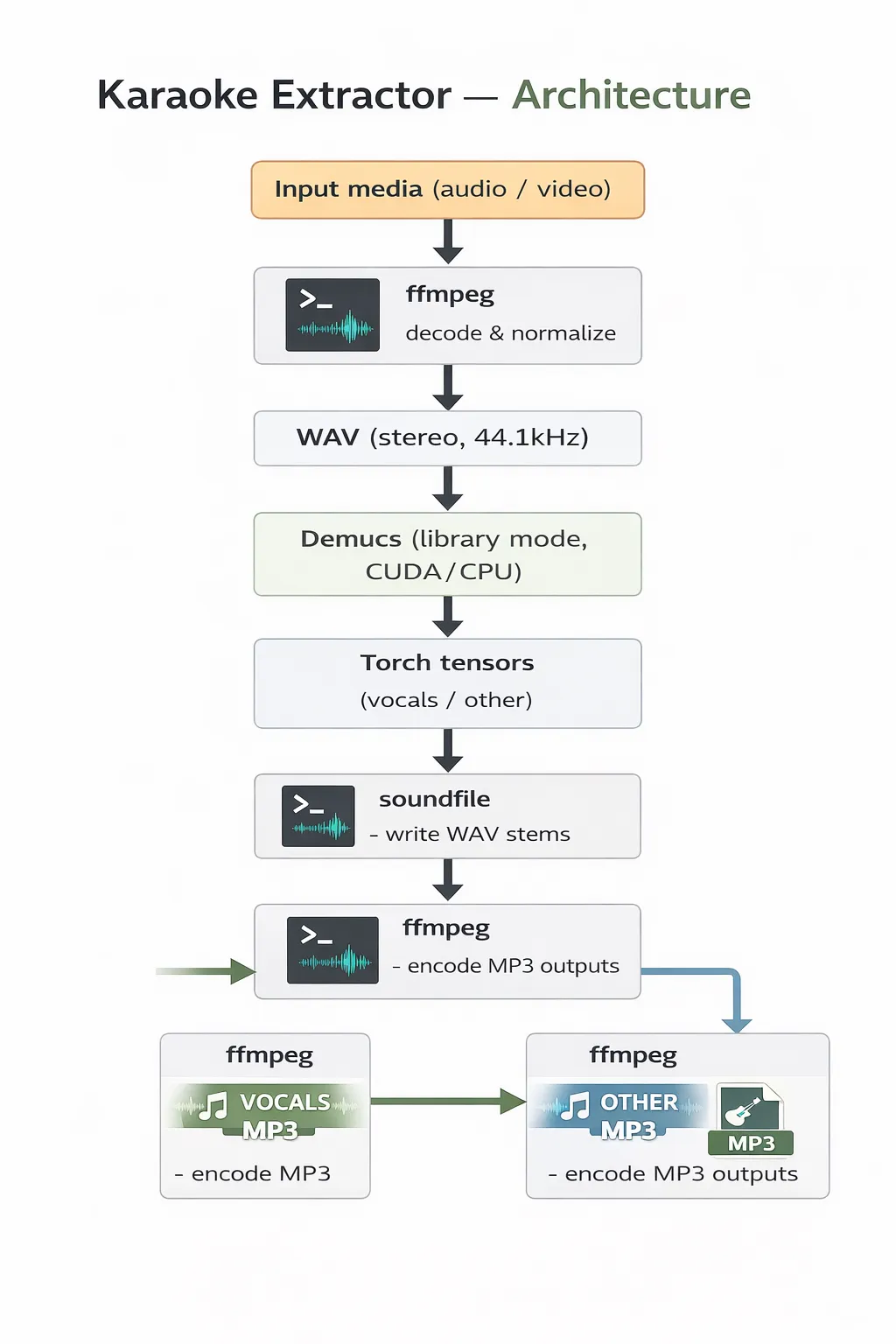
Architecture Diagram
Sample output at https://gist.github.com/pain459/9e0cedd0355aec25c7d9b420e8e4cb4f
What Works Well
- Classic rock and unplugged recordings sound great.
- Instrumentals are clean enough for karaoke, practice or just close your eyes and enjoy the vibe on a calm evening under sunset.
- GPU acceleration makes it fast enough to be fun!
What Still Needs Work
This is not perfect, and it doesn’t try to be.
- Vocals embedded deeply into instruments can leave artifacts
- Some genres separate better than others
- ML-based separation has some trade-offs, especially with bass.
There’s plenty of scope for improvement:
- Post-processing
- Equalizer tuning
- Batch workflows
- Upscaling
Why This Was Worth Building
Projects like this sit at a nice intersection:
- Modern ML capabilities
- Practical engineering choices
- Personal curiosity
It’s worth it when you’re listening to the instrumental you’ve separated yourself—playing through a Marshall speaker—on a warm evening, watching the sun go down, a cold one in hand.
And thanks to how far tools like Demucs have come, that curiosity is now just a command away!
If you enjoy building small, practical tools—especially ones that let you rediscover familiar things in new and exciting ways to satisfy that itch—this kind of project is absolutely worth a weekend.
Links:
Code at https://github.com/pain459/karaoke_extractor
Demucs https://github.com/facebookresearch/demucs
Originally published on Medium on January 1, 2026.