PDF to Audiobook: A Containerized Pipeline with an LLM Sanitizer and Transformer TTS
A containerized local pipeline that extracts and sanitizes PDF text, synthesizes speech, and assembles a finished audiobook.
This weekend I wanted to create a pipeline that could take any PDF and produce an audiobook locally. I have too many PDFs now, and not all books have audiobooks associated with them.
The requirement was to keep it containerized, configurable, and predictable. Text-to-speech conversion is straightforward these days, but I wanted the audiobook to sound natural as well.
The flow I built uses a combination of extractor → sanitizer → chunker → TTS → muxer. These are just names; feel free to modify them in the code. The only external call is in the sanitizer layer, where I use an LLM to clean the text before it goes into speech synthesis.
Precautions, Limitations, and Tips
I want to put these points right at the start. I’m not responsible if you exhaust your token limit while calling the ChatGPT APIs. Read the instructions carefully before proceeding.
- The chat completions API comes with a cost. Run the cost analyzer before running code that calls the OpenAI API. The sample book I used cost around $0.08 with the
gpt-4o-minimodel. - Resources affect speed: allocating fewer resources slows the process. The same applies to large PDFs.
- There is no support for multiple files yet. I plan to add it in the future.
- No OCR support for now, will be added soon.
- Run tests for speech and adjust config files as needed. Be creative in that space.
Why sanitize?
Raw PDF text is rarely suitable for direct speech.
- Page numbers, headers, footers run into the flow.
- Hyphenation splits words.
- Paragraphs break in the wrong places.
If you pass this directly into a TTS model, you’ll hear the problems and be disappointed.
That’s where the LLM layer helps. The sanitizer takes raw extracted text, removes artifacts, re-flows it into readable sentences, and keeps the meaning intact. No summarization, no re-writing—just making it “speakable.”
High-level design
Basic idea:

flow diagram of the system
Detailed flow:
flowchart TD
 A["PDF File data/in/*.pdf"] --> B["Extractor from data/in/book.pdf to data/out/book.txt, cpu=1, mem=512m"]
 B --> C["Sanitizer from book.txt to book.clean.txt, mode=llm regex, cpu=1, mem=512m"]
 C --> D["Chunker from book.clean.txt to segments.jsonl, cpu=0.75, mem=256m"]
 D --> E["Piper TTS from segments.jsonl to audio/*.wav, cpu=6, mem=2g"]
 E --> F["Muxer from audio/*.wav to book.mp3, cpu=4, mem=2g"]
 F --> G["Final Audiobook data/out/book.mp3"]

 subgraph "Shared Volumes & Env"
 V1["Shared data directory ./data to /data including in/, out/, audio/, segments.jsonl"]
 V2["Shared Piper models piper_models to /models persist TTS voices"]
 V3["Environment file .env passed only to Sanitizer"]
 end

 B --- V1
 C --- V1
 D --- V1
 E --- V1
 E --- V2
 F --- V1
 C --- V3

 click G "#" "All containers: read only file system, tmpfs:/tmp, no new privileges, healthchecks, CPU/mem limits"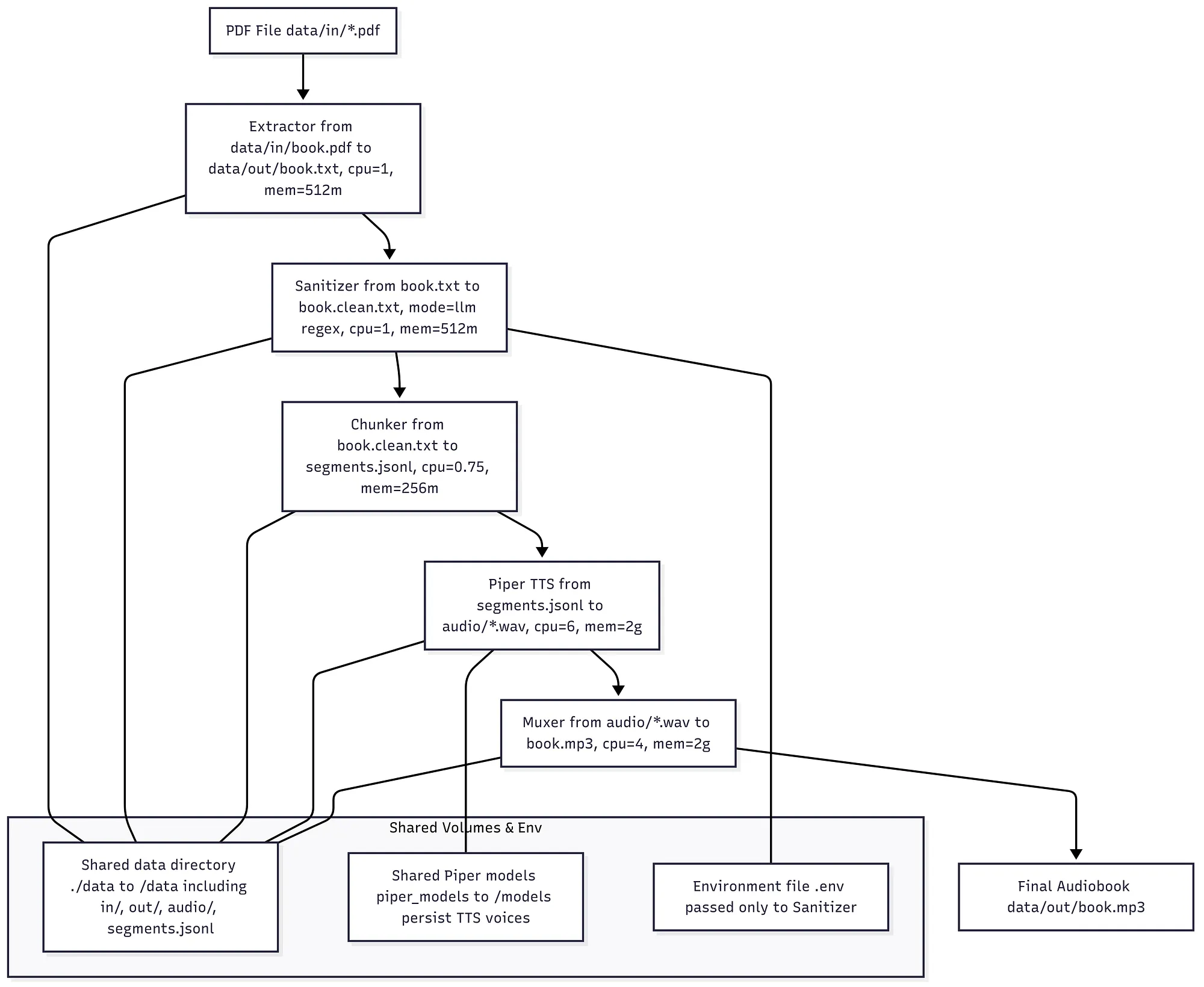
Detailed flow of the system. Resources can be modified as per your needs, hence speed.
Key components
Extractor
- Runs as a container (modules/extractor).
- Converts PDF → plain text (/data/out/book.txt).
- Keeps memory and CPU limited (512m, 1 CPU).
- Read-only filesystem, tmpfs for temp.
Sanitizer (LLM or regex)
- Container (modules/sanitizer).
- Takes raw text → cleaned text (book.clean.txt).
- Supports —mode llm (OpenAI) or —mode regex.
- Reads secrets from .env, never from raw shell.
- Limited to 512m, 1 CPU.
Chunker
- Container (modules/chunker).
- Splits text into segments (segments.jsonl).
- Configurable target/min/max characters.
- Useful for aligning with Piper’s processing size.
Piper (TTS)
- Container (modules/tts_piper).
- Transformer-based TTS using Piper.
- Outputs WAV files in /data/out/audio.
- CPU-intensive, so the service is allocated 6 CPUs and 2GB RAM.
- Models are mounted in a Docker volume (piper_models).
Muxer
- Container (modules/muxer).
- Reads WAVs and segment map, merges them.
- Adds silence, applies FX, and writes metadata.
- Outputs MP3 in /data/out/book.mp3.
Technology stack
- Python → extractor, sanitizer, chunker
- OpenAI API → sanitizer (optional, via .env)
- Piper → local transformer-based TTS
- FFmpeg → muxer (audio concatenation and effects)
- Docker Compose → orchestration, resource limits, env injection
Running the pipeline
There are 2 ways to run the entire pipeline.
Clone, build and run:
git clone --depth 1 --filter=blob:none --sparse https://github.com/pain459/projects/
cd projects
git sparse-checkout set pdf-to-audiobook
docker compose build
Put a PDF in data/in/ and run:
./audiobook.sh --title "My Book" --author "Author Name" --narrator "Lessac"Below are the steps that execute in order.
$ ./audiobook.sh

[2025-08-24 23:59:10] Tip: set piper 'cpus:' in docker-compose.yml ≈ --jobs (6) for best throughput.

[2025-08-24 23:59:10] Build images (if needed)
--- build logs ---
#51 DONE 0.0s
[+] Building 5/5
 ✔ pdf-to-audiobook-chunker Built 0.0s
 ✔ pdf-to-audiobook-piper Built 0.0s
 ✔ pdf-to-audiobook-muxer Built 0.0s
 ✔ pdf-to-audiobook-extractor Built 0.0s
 ✔ pdf-to-audiobook-sanitizer Built 0.0s

[2025-08-24 23:59:13] 1/5 Extractor → PDF → text
/usr/local/lib/python3.11/site-packages/pypdf/_crypt_providers/_cryptography.py:32: CryptographyDeprecationWarning: ARC4 has been moved to cryptography.hazmat.decrepit.ciphers.algorithms.ARC4 and will be removed from cryptography.hazmat.primitives.ciphers.algorithms in 48.0.0.
 from cryptography.hazmat.primitives.ciphers.algorithms import AES, ARC4
{
 "pages_detected": 132,
 "words": 59294,
 "chars": 325629,
 "out_file": "/data/out/book.txt"
}

[2025-08-24 23:59:16] 2/5 Sanitizer → clean text (deterministic + LLM)
2025-08-24 18:29:16 | INFO | sanitizer | loaded: /data/out/book.txt | chars=325629 | mode=llm
2025-08-24 18:29:16 | INFO | sanitizer | deterministic pass: start
2025-08-24 18:29:16 | INFO | sanitizer | deterministic pass: done
2025-08-24 18:29:16 | INFO | sanitizer | llm pass: chunk 0: 59606 chars
2025-08-24 18:33:08 | INFO | sanitizer | llm pass: chunk 1: 57605 chars
2025-08-24 18:36:36 | INFO | sanitizer | llm pass: chunk 2: 57794 chars
2025-08-24 18:39:42 | INFO | sanitizer | llm pass: chunk 3: 59883 chars
2025-08-24 18:42:49 | INFO | sanitizer | llm pass: chunk 4: 59445 chars
2025-08-24 18:45:11 | INFO | sanitizer | llm pass: chunk 5: 27196 chars
2025-08-24 18:46:43 | INFO | sanitizer | llm pass: done in 1046.4s | chunks=6 | chars_out=298834
{
 "in_file": "/data/out/book.txt",
 "out_file": "/data/out/book.clean.txt",
 "mode": "llm",
 "chars_in": 325629,
 "chars_out": 298834,
 "reduction_pct": 8.23
}
2025-08-24 18:46:43 | INFO | sanitizer | wrote: /data/out/book.clean.txt

[2025-08-25 00:16:43] 3/5 Chunker → segments
{
 "in_file": "/data/out/book.clean.txt",
 "out_file": "/data/out/segments.jsonl",
 "segments": 349,
 "total_chars": 298131,
 "total_words": 54266,
 "avg_chars_per_segment": 854.2
}

[2025-08-25 00:16:44] 4/5 Piper → synthesize WAVs
piper x6: 100%|█████████████████████████████████████████████████████████████████████████████████████████████████████████████████████████████████████| 349/349 [54:15<00:00, 9.33s/it]
{
 "segments_processed": 349,
 "segments_total_in_range": 349,
 "jobs": 6,
 "audio_dir": "/data/out/audio",
 "sample_rate": 22050,
 "errors": []
}

[2025-08-25 01:11:00] 5/5 Muxer → final MP3
{
 "input_segments": 349,
 "silence_ms": 120,
 "chapter_silence_ms": 900,
 "chapters_strategy": "headings",
 "fx": "warm",
 "out_file": "/data/out/book.mp3",
 "format": "mp3"
}

[2025-08-25 01:15:35] Done in 4585s → book.mp3
Output: data/out/book.mp3
Result will be in data/out/book.mp3.
Manual usage (per stage)
This pipeline is easy to run end-to-end with ./audiobook.sh, but you can also run each stage by hand. That’s useful for debugging, experimenting, or rerunning only one part.
0) Build images
Do this once or after changing code:
docker compose build extractor sanitizer chunker piper muxer1) Extractor → PDF to raw text
- Input: data/in/book.pdf
- Output: data/out/book.txt
docker compose run --rm extractor2) Sanitizer → Clean text
- Input: data/out/book.txt
- Output: data/out/book.clean.txt
docker compose run --rm sanitizerOptional: Estimate tokens/cost (no API calls)
docker compose run --rm sanitizer \
 /data/out/book.txt /data/out/book.clean.txt \
 --mode llm --estimate
3) Chunker → Text to segments
- Input: data/out/book.clean.txt
- Output: data/out/segments.jsonl
docker compose run --rm chunkerUses .env values like CHUNK_TARGET_CHARS, CHUNK_MAX_CHARS, CHUNK_MIN_CHARS.
4) Piper (TTS) → Segments to WAVs
- Input: data/out/segments.jsonl
- Output: data/out/audio/0000.wav, 0001.wav, …
docker compose run --rm piper \
 --jobs 6 --skip-existing \
 --global-tempo 0.9 \
 --disable-seg-pitch --global-pitch 0.0 --max-abs-pitch 0.0
Optional: Voice test (short sample, no segments)
docker compose run --rm piper \
 --test-voice narrator \
 --test-text "This is a short narrator test sample." \
 --global-tempo 0.9
Optional: Re-render a slice
docker compose run --rm piper \
 --only-range 0:20 --jobs 4 --skip-existing \
 --global-tempo 0.9 --disable-seg-pitch --global-pitch 0.0 --max-abs-pitch 0.0
5) Muxer → WAVs to final audiobook
- Input: data/out/audio/*.wav (+ segments.jsonl for chapters)
- Output: data/out/book.mp3
docker compose run --rm muxer \
 --out /data/out/book.mp3 --format mp3 \
 --fx warm --chapters headings \
 --silence-ms 120 --chapter-silence-ms 900 \
 --title "My Book" --author "Author Name" --narrator "Lessac"
Optional: Export M4B
docker compose run --rm muxer \
 --out /data/out/book.m4b --format m4b \
 --fx warm --chapters headings \
 --silence-ms 120 --chapter-silence-ms 900 \
 --title "My Book" --author "Author Name" --narrator "Lessac"
Optional: Concatenate to WAV only
docker compose run --rm muxer \
 --out /data/out/book.wav --format wav \
 --fx none --chapters none
Notes and tips
- Piper’s
cpusvalue indocker-compose.ymlshould roughly match your--jobsvalue (cpus: 6.0→--jobs 6). - .env controls pacing and safety (e.g., PIPER_LENGTH_SCALE, PIPER_SENTENCE_SILENCE, PIPER_PITCH_ZERO_THRESH, PIPER_SOXR).
- If you need to overwrite some WAVs, delete them first. Piper won’t re-render if —skip-existing is set.
Why this works well
- Isolation: each stage has its own container and clear boundaries.
- Security: .env holds secrets, never baked into scripts.
- Flexibility: can switch sanitizer mode to regex for fully offline runs.
- Performance control: CPU and memory limits per service.
- Reproducibility: run the script again and get the same output, unless the input PDF changes.
Try it out
If you have a PDF you’d rather listen to than read, this setup is straightforward.
Drop the file in, run the script, and you’ll get an audiobook with proper flow and structure.
References
https://huggingface.co/csukuangfj—Language synthesis
https://platform.openai.com/docs/api-reference/chat—OpenAI chat completion API.
https://www.mermaidchart.com/—Create flowcharts via code
https://docs.docker.com/compose/—Containerization with Docker
Originally published on Medium on August 24, 2025.